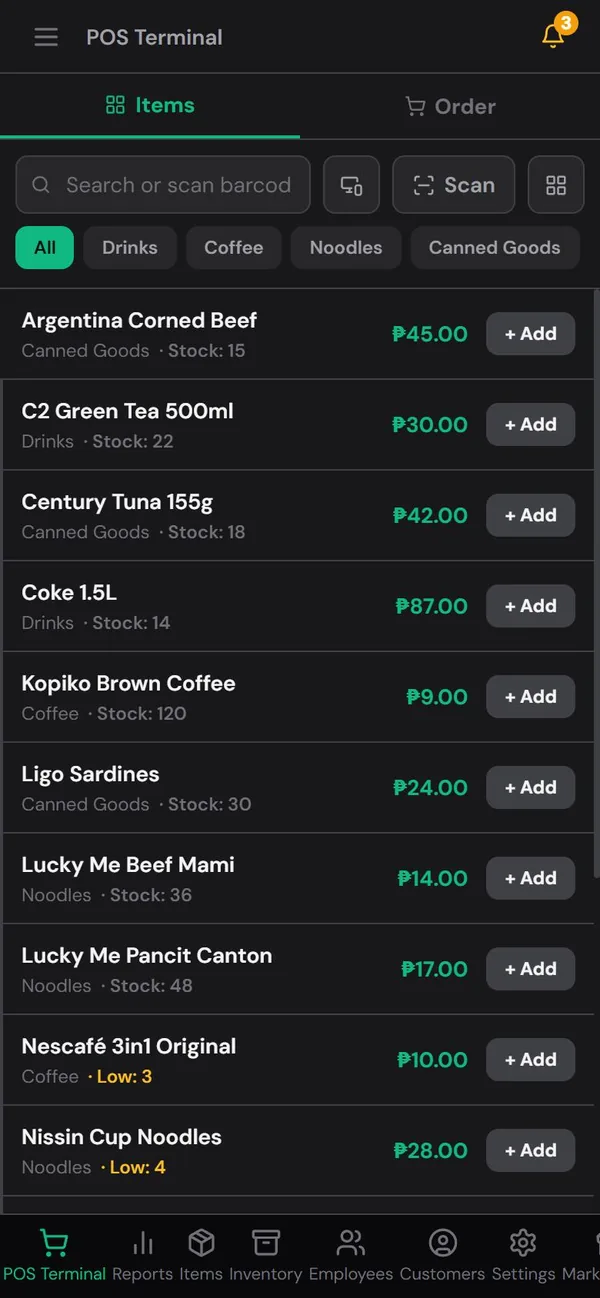
Two worries stop a lot of store owners from trying a POS. The first is cost: "Kailangan ko pa ng computer, scanner at printer." The second is the internet: "Paano kung walang signal sa amin?"
Both are fair questions, especially for a sari-sari store in a province where signal comes and goes and brownouts are part of the week. The short answer is that a phone you already own is enough to start, and selling doesn't stop when the internet does. Here's what that looks like in practice.
You can start with just your phone

A modern POS like HuggsPOS runs in the phone's browser, so there's nothing expensive to buy on day one. Here's how each "required" piece of equipment is covered by the phone:
- Barcode scanner → the phone's camera. Tap Scan on the register and point the back camera at the barcode. The item goes straight into the cart. It works in Chrome on Android and in Safari on iPhone.
- Computer → the phone itself. Sales, stock levels and reports are all on the phone. You can check today's sales from the same screen you sell from.
- Receipt printer → optional. Most small stores sell without printing receipts at all. If you need printed receipts later, a small Bluetooth thermal printer works with an Android phone or tablet.
When to add more equipment
Start with the phone and upgrade only when the store needs it. Signs it's time:
- The line gets long. A USB or Bluetooth barcode scanner is faster than the camera when you scan dozens of items an hour.
- You need a bigger screen. A computer or tablet at the counter makes it easier to see the cart and the item list at the same time.
- Customers want to see the total. A second screen can face the customer and show their items, the total and their change.
The point is that the equipment grows with the store, not the other way around. You're not paying for a full counter setup before you know the system fits how you work.
What happens when the signal drops

Selling continues. Once you're signed in to HuggsPOS on a device, you can keep ringing up sales even with no internet at all:
- Every sale is still recorded on the phone, and stock goes down as you sell.
- The sales wait on the device. The status at the top of the app shows how many changes are still waiting to sync.
- When the signal comes back, everything uploads automatically. You don't have to press anything, and your reports end up complete.
A brownout works the same way. As long as the phone has battery, the store keeps running. That's one advantage of a phone over a desktop computer: it doesn't switch off when the power does.
Three things to remember about offline selling
- Sign in while you have internet. The very first sign-in on a device needs a connection. After that, the device can work offline.
- Don't sign out or clear the browser's data while sales are still waiting to sync. Those sales live only on that phone until they upload. Wait until the waiting count is back to zero.
- Keep the phone charged. A small power bank at the counter is cheap insurance for long brownouts.
Why this matters for a small store
The usual alternative to a POS is a notebook (kwaderno), and the notebook has the same strengths: it's cheap and it works without signal. A phone POS keeps those strengths but adds what the notebook can't do: totals add up by themselves, stock goes down with every sale, and you can see the day's sales and profit without counting pages at night.
If your store has unreliable signal, test it before you commit: sign in, turn on airplane mode, sell a few items, then turn the internet back on and check that the sales appear in your reports. It takes five minutes and tells you exactly how the system behaves in your store.